Extremely happy Team Gravity released GP Bookings. Customers spoke, you listened!
Feedback:
Any plans to delete the link, Bookings from Gravity Forms, from your website? In my opinion, it creates confusion as to which is the preferred (or official) bookings add-on for Gravity Forms.
At what point do you think you’ll release a rock-solid version of GP Bookings? Currently, it’s still beta (Version 1.0-beta-1.1).
At what point do you think you’ll release the following features: (a) A time zone auto-detect or selector for visitors, (b) Multiple appointment capabilities for a single booker, (c) In addition to Google Calendar, ability to log appointments with other, popular calendars (i.e., Outlook, iCalendar), (d) Ability to set up meetings online via popular platforms (i.e., Google Meet, Microsoft Teams, Zoom). A publicly-available roadmap for these features and others would be nice (a summary, at least).
Is GP Bookings compatible with PHP 8.5.X? Where can I find the system or environmental requirements for GP Bookings?
I viewed your instructional video. Is it possible to edit/change the name of the resource type? (e.g., from “barber” to “consultant” or anything else)
Can I set a price of, say, $0.00 for free or complimentary services?
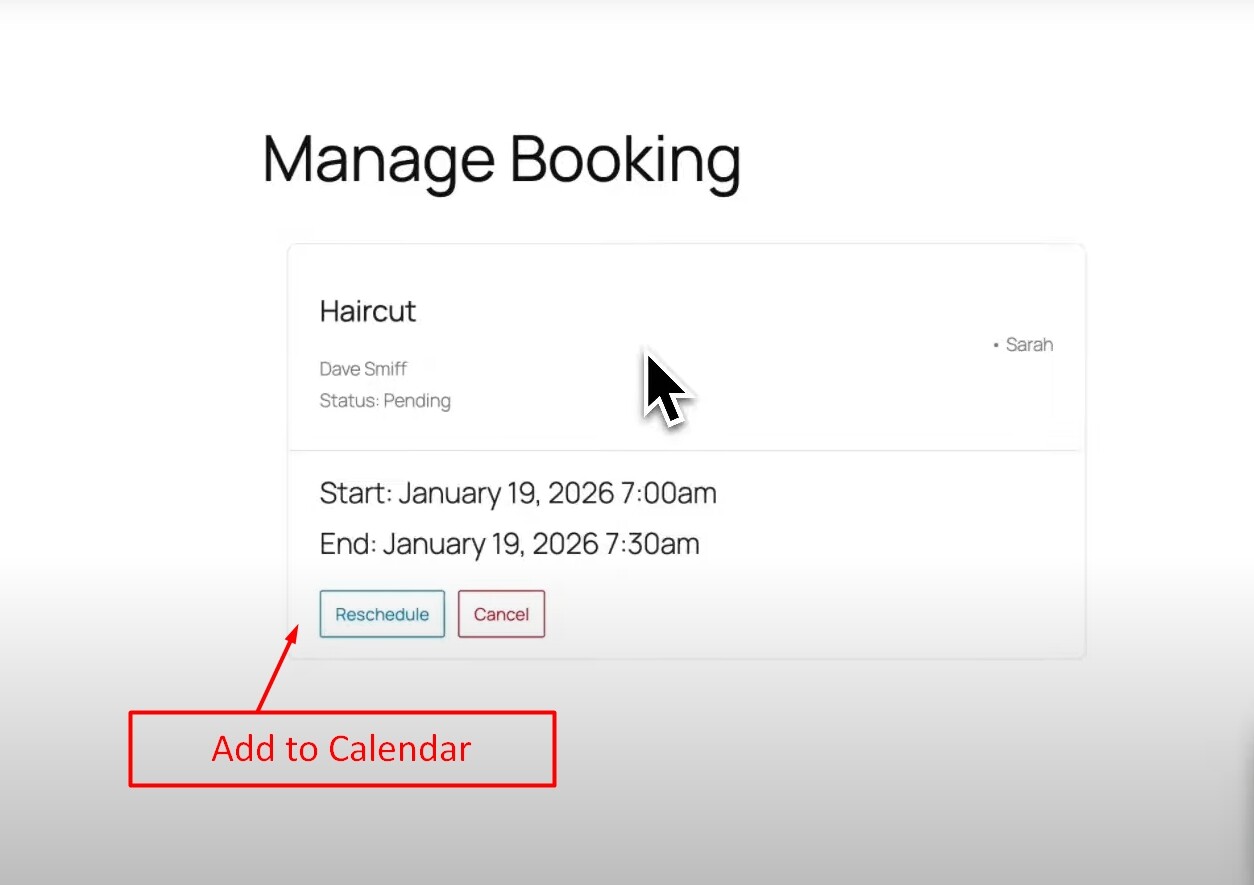
How does the customer add their appointment(s) to their calendar(s)? I did not see any reference to that in your video. See below screenshots.
Hey Jonathan! Love to see the excitement. We’ve been cooking this booking solution for a long time.
Gravity Forms doesn’t have their own official booking add-on. The add-on you linked to is a solution by GravityMore, a third-party developer. GP Bookings is a solution by Gravity Wiz (us!), a certified partner of Gravity Forms. Funnily enough, our CEO helped develop Gravity Forms, but we’re not Rocketgenius, the company behind it. We do like to consider ourselves to be a part of “Team Gravity” together with all other partners, though.
GP Bookings is currently in Beta because there are a handful of features we want to implement before giving it the shiny 1.0 badge. Even so, it is thoroughly tested, rock-solid and ready for production.
a) Time zone auto-detect or selector for visitors.
This is one of those possible 1.0 features I mentioned. Currently, GP Bookings can detect if the user is in a different timezone and display a message letting them know in what timezone the times are being displayed in.
b) Multiple appointment capabilities for a single booker.
I’m eager to understand this point better. (More on this below.)
c) In addition to Google Calendar, ability to log appointments with other, popular calendars (i.e., Outlook, iCalendar)
This is already possible.
d) Ability to set up meetings online via popular platforms (i.e., Google Meet, Microsoft Teams, Zoom).
This is in our roadmap and a big step towards it is coming out soon.
GP Bookings should be compatible with PHP 8.5.X, but we haven’t tested that ourselves. We require PHP 8 for GP Bookings. All other requirements are the same as Gravity Forms.
Yup! Service and resource names can be changed at any time.
To set the price as “$0.00” you can just not create any pricing rules. We probably should make it possible for pricing rules to allow “0” values in case the user can choose paid add-ons for an otherwise free service.
Great question. This is currently not supported, but we have exciting plans for it.
Hope this helps! If you’re open to it, I’d love to keep exploring possible future features (like multiple appointment capabilities) via email. If you have any other questions, let us know.
Based on our experience using other GF-compatible booking plugins (e.g., gAppointments), the following features are key for us:
3(a) (Time Zone Auto-Detect). Reason: We have clients worldwide. When booking in their foreign timezone, there’s always an issue trying to confirm with the client if the booking time is in their time zone or ours. So, to be more specific, does your plugin automatically convert our available services hours to their time zone prior to booking?
3(b) (Multiple Appointments Capabilities): To be more specific, can a single person book several services in one booking session? (e.g., same person wants to book a free consultation session to understand better our business and also book a separate (paid) technical session).
6 (Setting Price to $0.00): This is crucial when a client or customer wants to book both a free service and a paid service during the same booking session. Can you plugin do that? Can you soon add to your plugin the ability to set a price of $0.00 for a given service?
Other:
Based on your previous reply, can you kindly update this link to specify your plugin’s current limitations and environmental requirements? It appears your plugin has more limitations than those posted.
As soon as the above is addressed, our team will happy to purchase and explore your plugin in more detail.
Adding to 3(a) above: In lieu of automatically converting our available service hours to their time zone prior to booking, it would be extremely beneficial to add a time-zone dropdown menu to the booking page so the customer can select their time zone. Once the new time zone is selected by the customer, the service (or availability) hours will automatically change to match the time zone selected. Makes sense?
3(a) (Time Zone Auto-Detect, including your latest addition). Your reason makes a lot of sense. GP Bookings currently only deals in the site’s timezone, so the timezone you and your clients would see and deal with is the one set in the WordPress settings. I’m hoping the auto-detect will be a 1.0 feature. If auto-detect is available, can you foresee a reason to have the drop down also?
3(b) (Multiple Appointments Capabilities): Yes, this is currently possible with multiple Booking fields.
6 (Setting Price to $0.00): I think this might be an easy win. I’ll consult with our devs.
About the documentation, I’m a bit wary of adding what we’ve discussed as limitations for now. We’re moving very fast with GP Bookings, so I can see this becoming more of a management overhead when these specific features might be implemented very soon. I’m taking your feedback to heart though, and once we have a more solid idea of what we’re pursuing in the near future and what might take a while for us to get to, we can explore adding them as Known Limitations.
Adding the environmental requirements are a great idea! We’re currently exploring the best way to go about it for all of our plugins.
I appreciate you taking the time to share your thoughts and insights with me. 1.0 is looking bright!
3(a) (Time Zone Auto-Detect): If the time zone auto-detect feature is available and the service (i.e., availability) hours are converted to the customer’s time zone hours, the drop down should not be required. Thought: With so many time zones around the world, to minimize errors, it might be better to set up your code or plugin to display a time zone drop down menu that would use the time zones available in WordPress > Dashboard > Settings > General > Timezone
3(b) Multiple Appointments Capabilities): Great!
6 (Setting Price to $0.0): Great! It should be easy to allow the pricing field to accept “$0.00” (or simply “0” or “0.0”) for free products or services.
7 (Ability for Customer to Add Appointment to their Calendar): To confirm, and based on your previous answer, are you saying that your plugin currently does not allow customers to automatically add their appointments to their calendar of choice? Is it possible to add that option in the customer’s email confirmation (currently)?
Updating Documentation: You’re right! No need to update it knowing that V1 (or V2) stable will address those limitations.
Environmental Requirements: Posting the environmental requirements for your plugin (WordPress, PHP, JS, and Memory) will minimize the issuance of refunds or custom solutions to customers that do not meet (or have not read) your plugin’s environmental requirements.
My pleasure! I’m tracking on 3(a), 6, and everything documentation related. Thank you for being so thorough!
About 7, GP Bookings does not allow customers to automatically add their appointments to their calendar of choice currently. We’re working to make them be able to add their appointments to Google Calendar—we’re shooting for around March. That would include being able to add that option in the customer’s email confirmation, which is not currently possible.
Support for more calendars is in our roadmap, but no timeline just yet.
If you don’t mind, I would like to share a useful tip with you.
Compatilibility Testing: If not yet performed, please ensure GP Bookings is compatible with the top-three Gravity Wiz add-ons or plugins used by your customers, including GW Cache Buster (versions 0.6.4 and up).
Reason: We do not use GP Bookings (yet), instead we use gAppointments. However, when I enabled GW Cache Buster on our site, the affected gravity form loaded/displayed properly, but the embedded gAppointments calendar did not.