In the form, I added a LIST field for entering the names of the guests. After the website visitor fills out the form and submits it, I receive a table in my email. I really need these names to be in alphabetical order. Is there any way to do this?

Hi there,
Could you please export the form and upload it to a file-sharing website such as File Mail?
Then, send me the link so I can download the form and test it on my sandbox website to take a closer look at the issue. Thank you
Thank you very much for your reply. I was unable to create an account on Filemail, however, here is the exported form file and also the test results we ran using TransferXL. The form is in Portuguese (Brazil).
Hey there,
Thanks for uploading the form export!
For sorting those list field rows alphabetically, you should be able to achieve this with a PHP snippet, like this.
If you’ve never worked with a snippet before, we have a great article that goes over the different ways you can get started with the code: Where do I put snippets?
Finally, please note that this will run any time that the list field is saved, including the initial submission as well as entry editing.
Please give that a try, and let me know if that does the trick for you! 
Wonderful!!! You have no idea how much this will help us! It worked perfectly for the Guests field!
I noticed that at the beginning I indicated the field that should be organized, and I ask, is there a possibility of it organizing other list fields as well?
In our form, we have the names of “member’s dependents” (the first one in red), another for “Guests” (in green) and another for “outsourced workers” (second in red). I indicated the ID of the Guests field, and I would also like to organize the other two fields. Can I insert other IDs, or create other snippets for the other fields without affecting the one that is already working?
Once again, thank you very much for your feedback!
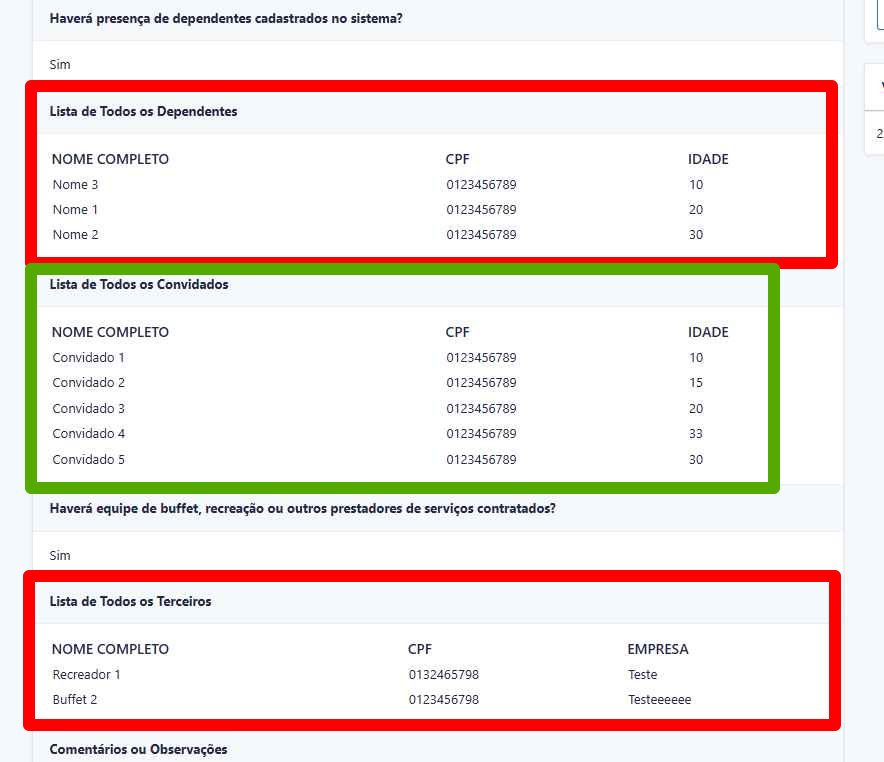
The field shown in green is already organized alphabetically, and I would like to organize the other two shown in red as well.
Sweet!! Glad to hear that it’s working for you so far.
Since all of those List fields in the screenshot are on the same form, you can just broaden the scope by changing the name of the filter.
Please try switching
gform_save_field_value_123_4
to
gform_save_field_value_123
The snippet will then apply to all the List fields on form ID 123.
Perfect! Thank you very much again!!